🎮
Part 110 min Getting Started with Roblox Studio
Roblox Studio is where the magic happens! It's the free tool that lets you build your own Roblox games. Let's get it set up!
Download Roblox Studio
- Open a web browser (like Chrome or Safari)
- Go to: create.roblox.com
- Click the big "Start Creating" button
- If you don't have a Roblox account, create one (ask a parent to help!)
- Download and install Roblox Studio
Installing programs usually needs a parent's password. This is a good time to ask for help!
Your First Look at Roblox Studio
When you open Roblox Studio, you'll see a screen with templates. For now, click on "Baseplate" - it's a simple flat world to practice in.

Screenshot: Your First Look at Roblox Studio
Explorer
Shows everything in your game (like a list of all your stuff)
Properties
Shows details about whatever you clicked on
Viewport
The big area in the middle - your game world!
Toolbox
Free models and items you can use (like a toy box!)
Try Adding a Part!
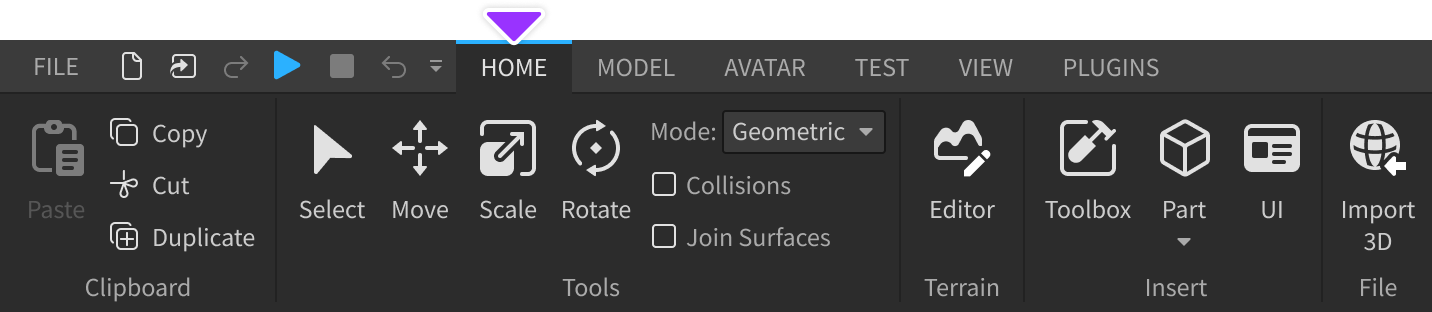
Screenshot: Try Adding a Part!
- Click the "Home" tab at the top
- Click "Part" - a gray block will appear!
- In Properties (on the right), find "BrickColor"
- Click it and pick a fun color!
- Press the Play button (▶) at the top to test your game!
✅ Checklist - Check them off!
You put a colored block in a game world and walked around it!